Pay later in ads · How-to
Showing tabby and tamara instalments in catalog ads, product by product
How an instalment line is worked out for each product in a catalog ad, why it is rounded up, and the limits to set before you switch it on.
By CatalogBadge team · Published · 3 min read
“4 payments of SAR 62.25” says more to a shopper scrolling past a 249 riyal pair of trainers than the price alone does. In the Gulf, where tabby and tamara sit on so many checkout pages, putting that line on the ad image itself is one of the simplest changes a store can make. The catch is that a catalog has hundreds or thousands of products at different prices, so the line has to be worked out for each one, and it has to be right.
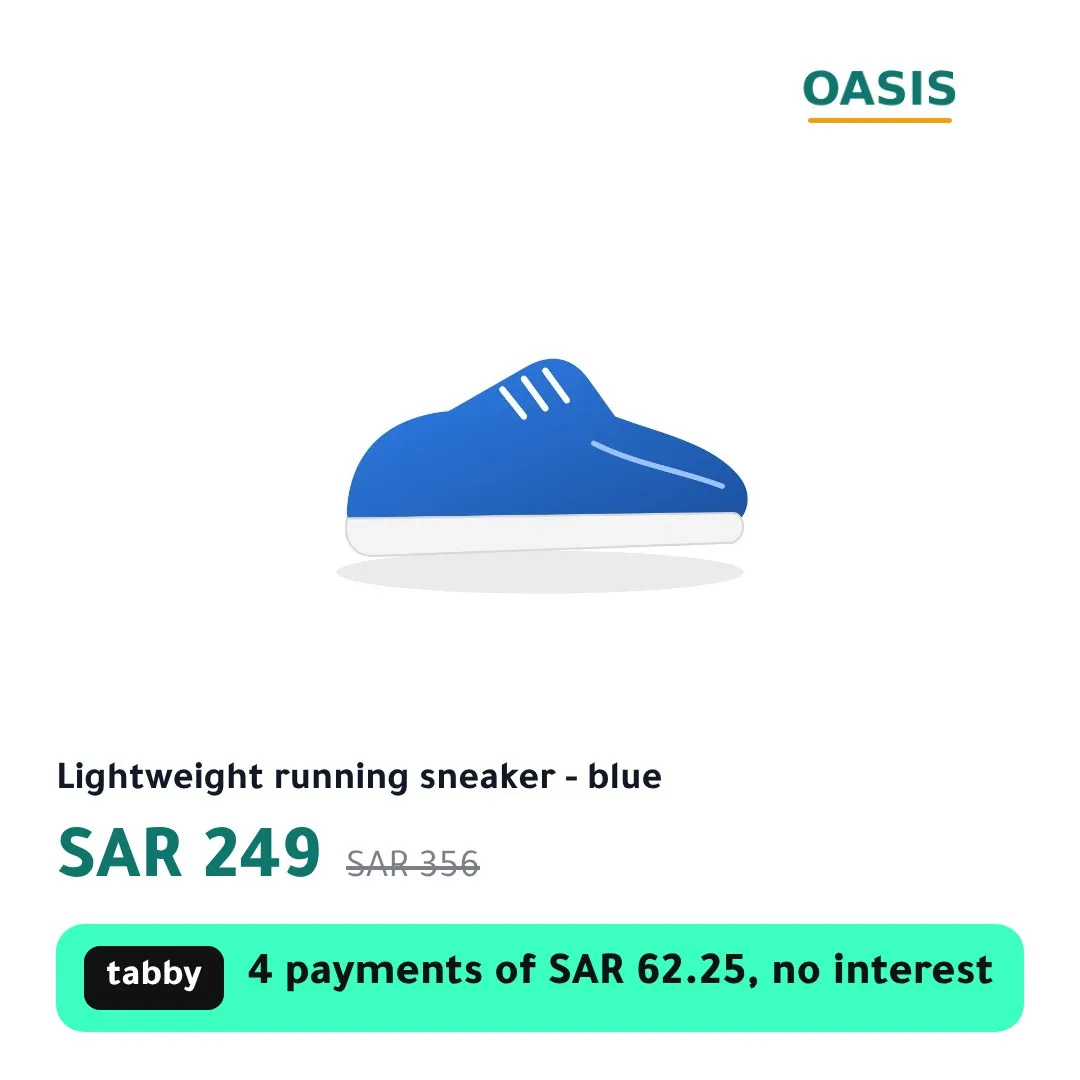
How the line is worked out
For each product, the amount comes from the price the shopper actually pays: the sale price when the product is on sale, the regular price otherwise. It is divided by the number of instalments and rounded up to the smallest unit of the currency, the halala for riyals or the fils for dirhams and dinars.
- SAR 249 in 4 payments is exactly SAR 62.25, so the line reads “4 payments of SAR 62.25, no interest”.
- SAR 250 in 4 payments is 62.50, also exact.
- SAR 199 in 4 payments is 49.75, exact again; SAR 199.99 is 49.9975, so the line shows “approx. SAR 50.00”.
Rounding up and saying “approx.” when the division is not exact means the image never promises a smaller instalment than the one the shopper will see at checkout. It is the same principle as the discount badge, which rounds the percentage down: a product cut from SAR 356 to SAR 249 is 30.06% off, and the badge says 30%, never 31%.
Set the limits before you switch it on
Pay-later providers only accept orders within a range of amounts, and that range depends on your agreement with them. If the image promises instalments on a product the provider will not finance, you have an ad that misleads and a shopper who abandons the checkout.
So the line appears only when the product’s price is within the minimum and maximum you set. Below or above that range, the image is drawn without it. Two settings to check in your provider’s merchant dashboard first:
- The order range you are approved for, as a minimum and a maximum.
- The number of instalments your plan offers. Four is the common split and the default; any count from 2 to 24 can be set.
If you offer both tabby and tamara with the same number of instalments, both names can share one line. If their counts differ, the first one in your order sets the line.
Arabic and English
The Arabic line is written natively, not translated: “٤ دفعات × ٦٢٫٢٥ ر.س بدون فوائد” with Arabic digits, or “4 دفعات × 62.25 ر.س بدون فوائد” with Western digits, whichever you choose for your store. Numbers and currency are isolated from the surrounding text, so they never flip direction in a right-to-left sentence.
When the price changes
An instalment line is part of the price. When a price or sale changes, the update that sees the change takes the image with the old instalment out of your feed, and your original product photo stands in until the new image is drawn. Your feed never points at “4 payments of SAR 62.25” on a product that now costs SAR 279. Meta and Snapchat pick up the change on their next fetch of the feed, which is why an hourly schedule in your catalog matters.
Outside the Gulf
The same line works for other providers, with their own names and wording: Klarna, Afterpay, Clearpay, Affirm, Shop Pay, PayPal Pay in 4 and Zip are ready to add from the Brand tab, and you can register any other provider with its own name per language.
To see the line on your own products, the Pay later template shows it in every size, and the preview in your dashboard draws it from your real prices before anything goes live.
Read next
Feed problems
Why your catalog ad still shows the old image, and when that is on purpose
The five reasons a Meta or Snapchat catalog keeps an old product image after a change, how to tell them apart, and the one that is a safety feature.
· 3 min read
Seasonal playbooks
Ramadan 2027 catalog ads: a setup checklist for Gulf stores
What to prepare before Ramadan 2027 so your catalog ads switch to the right designs on time, in Arabic and English, without a late-night manual change.
· 3 min read
See your own products as branded catalog ads before anything goes live.
Get started